Visualizer
The Visualizer (VIS) is a Streamlit web UI for
exploring CircuitGenome topologies interactively — pick a topology, swap the
module variant in each slot, and watch the block diagram and the assembled SPICE
netlist update live. It is a hands-on companion to the Topology Synthesizer: the
same build_circuit() machinery the
enumerator runs in bulk, driven one combination at a time from a browser.
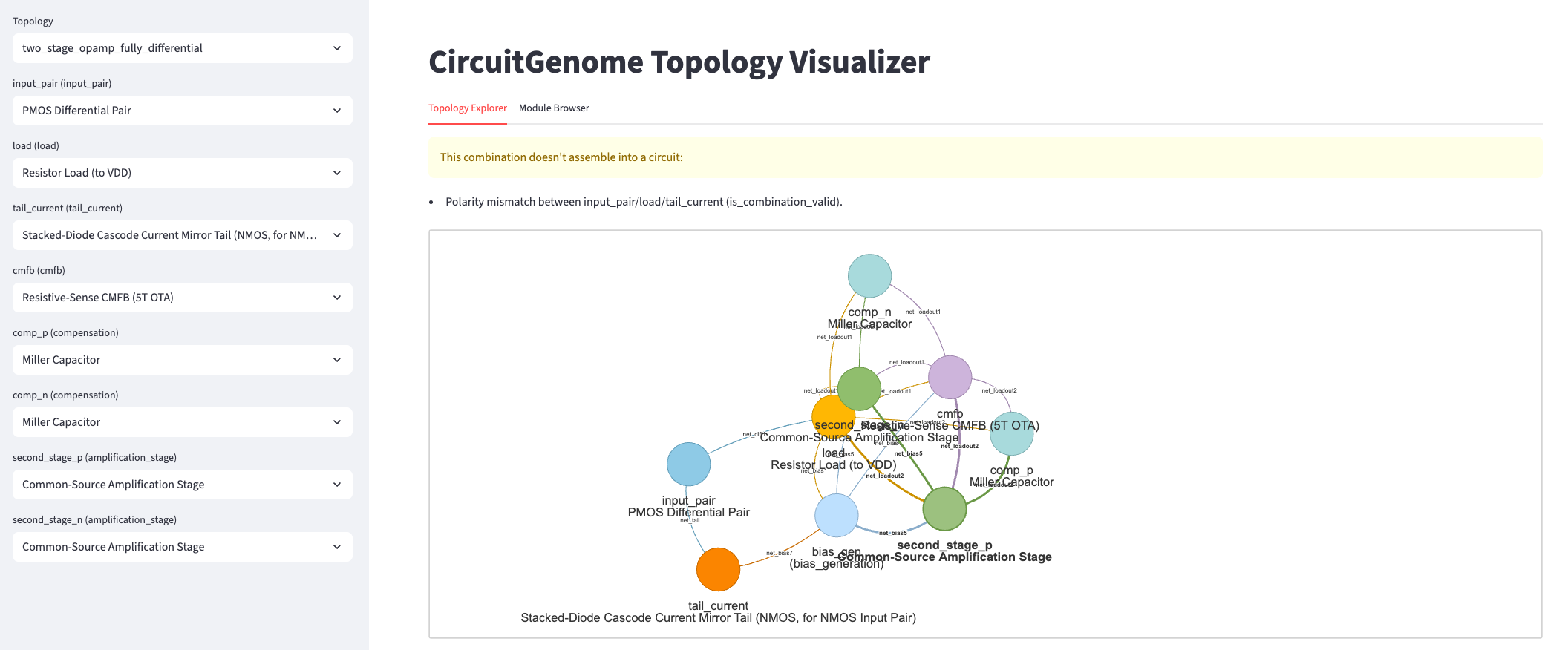
The Topology Explorer tab. The left sidebar holds one dropdown per slot; the main pane shows the block-diagram render and, when a combination is invalid, why it was rejected (here, a polarity mismatch between the input pair, load and tail).
Launching it
The Visualizer ships behind the viz extra (Streamlit and its dependencies):
pip install circuitgenome[viz]
circuitgenome visualize
The command starts the Streamlit server and opens the app in your browser. See
CLI Usage for the visualize command.
The two tabs
Topology Explorer. The sidebar exposes a dropdown for the topology and one
for every slot it declares (input_pair, load, tail_current,
cmfb, comp_p/comp_n, the amplification stages, …). Choosing a
variant for each slot assembles the circuit on the fly:
Valid combinations render the block diagram — each slot a coloured node labelled with its variant, wired by the topology’s net connections — and the assembled flat SPICE netlist beneath it.
Invalid combinations render no netlist; instead the app surfaces the exact reason
build_circuit()rejected the combination (e.g. “Polarity mismatch between input_pair/load/tail_current”), so the compatibility rules are visible rather than hidden behind a silent empty result.
Module Browser. Lists every module variant grouped by category, each with its canonical ports and device count — the catalogue the Topology Explorer’s dropdowns draw from.
Note
The Visualizer is an interactive tool, not a library API — there is no public
entry point to import. For programmatic access, use the Topology Synthesizer
(enumerate_circuits() /
build_circuit()) directly.